Well, necessity is the mother of invention…and I have discovered a new workflow to curate content. It still involves a few steps, but they are not as inconvenient as the previous one I was forced to go for when Zite 2.0 came out, eliminating full Evernote dialog box that allows you to select notebooks.
As I shared in this blog entry, as well as this one which included a response from the Zite CEO, I was a bit disappointed in Zite 2.0. When they updated to their latest version, I was no longer able to curate content in one step to Evernote.
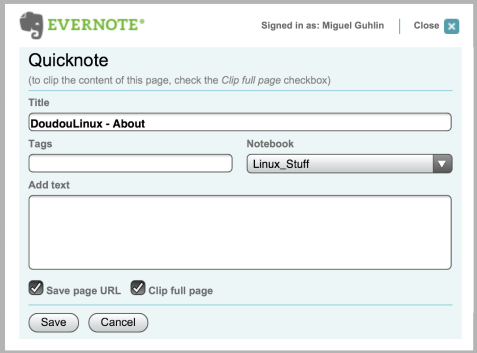
Notice the option of choosing the Notebook appears in the screenshot above. This screen was present in Zite, but is no longer available in Zite 2.0.
The new workflow takes advantage of Pocket, which enjoys wide support on iOS devices.
Pocket is integrated into over 317 applications across many platforms you may already use.This is because Pocket has an open API that allows users and developers to create their own Pocket applications, integrate them into their existing apps, and share them with other Pocket users.
The Pocket platform is host to 11,220 user created applications, 317 of which have been released publicly in this app directory.
Essentially, while viewing content in Zite or Flipboard, I click on the share button and choose to Read Later or select which tool I want to use to share with…I choose Pocket:
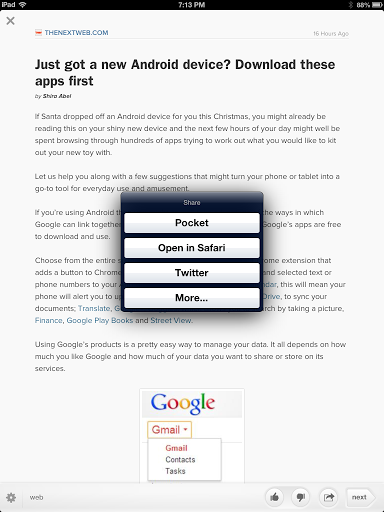
This allows me to select a few items in fairly quick order, until I get a list:
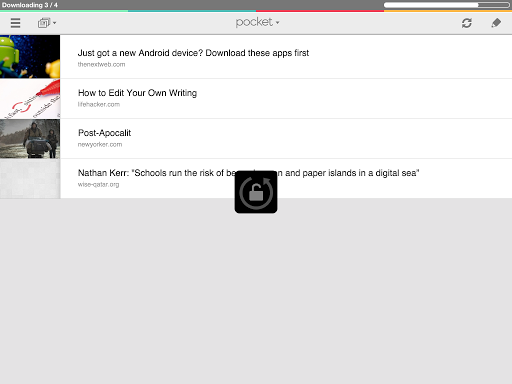
One of the neat features of Pocket is that it plays the role of Clearly, which I can’t use since I do most of my reading on my iPad or Android phone. As you can see from the list above, once I have a list, I can work through these items individually and sort them into the appropriate Evernote Notebook (as shown in the image below):
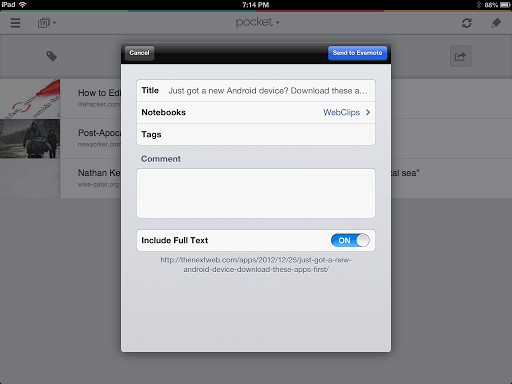
So, the new workflow goes something like this:
- Read content in my news/RSS reader of choice.
- Share it to Pocket
- Sort items in Pocket to Evernote.
Another neat aspect is that I’ve setup an IFTTT.com recipe to share any items I archive on Pocket to my LinkedIn account. Right now, I’m not automatically sending my Evernote notebooks–not all of them at least–straight to LinkedIn since not all of it is relevant stuff. However, anything I archive in Pocket is sent to LinkedIn.com, whether I’ve added it to Evernote Notebook or not.


var _gaq = _gaq || []; _gaq.push([‘_setAccount’, ‘UA-3445626-5’]); _gaq.push([‘_setDomainName’, ‘mguhlin.org’]); _gaq.push([‘_trackPageview’]); (function() { var ga = document.createElement(‘script’); ga.type = ‘text/javascript’; ga.async = true; ga.src = (‘https:’ == document.location.protocol ? ‘https://ssl’ : ‘http://www’) + ‘.google-analytics.com/ga.js’; var s = document.getElementsByTagName(‘script’)[0]; s.parentNode.insertBefore(ga, s); })();
Discover more from Another Think Coming
Subscribe to get the latest posts sent to your email.
 Another Think Coming