When your MySQL database table gets corrupted–a good reason to switch from MyISAM to INNODB database type, apparently and you have to do it for the latest version of Moodle anyways–PHPMyAdmin won’t necessarily be good enough to fix it. I wrote about one approach to fix the problem here using no-cost software, but you can also use others as well, as I pointed out below….
Whatever the reason, it’s nice to know how to repair the database using a GUI interface. Note that there are other MySQL GUI tools–aside from Navicat Lite for MySQL–you can use, such as SQLYog for Windows and/or Sequel Pro for Mac…both of those are free, open source and no-cost as well.
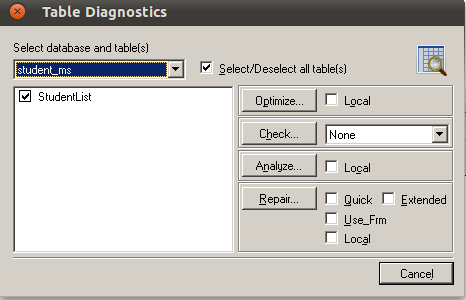
- Enter REPAIR TABLE tablename, for example, REPAIR TABLE StudentList.
- Click on GO button in PHPMyAdmin
- MySQL should now repair the table.
Get Blog Updates via Email!
Enter your email address:
Delivered by FeedBurner

 pingthis();
  Bookmark this on Delicious
 Subscribe to Around the Corner-MGuhlin.org
Everything posted on Miguel Guhlin’s blogs/wikis are his personal opinion and do not necessarily represent the views of his employer(s) or its clients. Read Full Disclosure
Discover more from Another Think Coming
Subscribe to get the latest posts sent to your email.
 Another Think Coming