Someone recently asked me, “You know how singers publish their songs as music videos on YouTube?”
<“How do you get the music without the video? Make it into an MP3 sound file?”
The easiest approach is to download the FLV video version of the music video and then strip out the audio and save it to MP3. Of course, there are approaches that allow you to go straight from YouTube video on the Web to an MP3 file you can save on your computer…we’ll start with those approaches first:

- Use Media-Converter, a web-based service that not allows you to convert video to audio, but you can actually browse YouTube and add items to the list to be converted. Pretty awesome!
- YouTube to MP3 Converter. From their web site: …the only thing you need is a YouTube URL. We will start to convert the audiotrack of your videofile to mp3 as soon as you have submitted it and you will be able to download it.
To convert from FLV to MP3…depending on what computer you are on:
- On UbuntuLinux, although it will probably work for others (download source here)
Required Software
I am using Ubuntu Linux, but the concept should be the same for other distros. Make sure you already have all of the multimedia codecs including ffmpeg and mplayer. You will also need to install youtube-dl:sudo apt-get install youtube-dl
Here’s the script…I renamed it to “video2mp3.sh“Downloading YouTube Videos on Linux (works on Windows)
To download YouTube videos on Linux, use youtube-dl in the terminal like this:
youtube-dl [options] video_urlRipping MP3s from YouTube Videos on Linux
It is easy to extract MP3 audio from a YouTube movie on Linux with mplayer.
The method to rip MP3 audio from FLV files with ffmpeg from this site doesn’t work on my computer so I use mplayer to do it:
mplayer -dumpaudio old-file.flv -dumpfile new-file.mp3Automating the Process with a Shell Script
If you want to download a set of YouTube movies and convert them to MP3 audio, or save them as MPG movies on your hard drive, you can automate the process with a shell script.This is just a quick script showing how it might be done. Use the following code at your own risk, and make sure you understand what it does before doing it. It will delete all the FLV files in the current directory after it processes them.
Follow the excellent instructions outlined at this blog post. Works great and not just for YouTube downloaded videos in FLV format…you can use it to extract audio from ANY FLV file. The command using ffmpeg:
- ffmpeg -title “my_title” -i filename.flv -acodec mp3 -ac 2 -ab 128 -vn -y filename.mp3
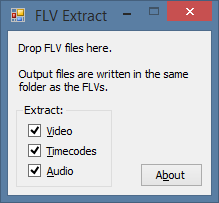
- Use FLV Extract…you’ll need to have .NET Framework 2.0 installed. The benefit of using FLV Extract, as opposed to other converters, is that the program won’t re-encode the audio (which might result in sound quality issues). FLV Extract can do multiple files at once, so…this may be the best app if not using a web-based service.
- Download FLV video then use one of these 4 tools to convert it….
Use Freez FLV to MP3 Converter – http://tinyurl.com/5jhjhh
Use VLC Media Player – http://videolan.org – Record online video stream to a file.
WinFF or FormatFactory – http://www.formatoz.com/ - Pay for a software program that will do the conversion for you…more on that below.
- Use GetTube, an application that will allow you to download YouTube video straight to MP3. I couldn’t get this to work in Snow Leopard 8-<
- Use Free Video Downloader and then convert it with VLC Media Player.
For general conversion on a Mac, you might consider FFMPEGX…$15 shareware. Sigh.
 Subscribe to Around the Corner-MGuhlin.org
Everything posted on Miguel Guhlin’s blogs/wikis are his personal opinion and do not necessarily represent the views of his employer(s) or its clients. Read Full Disclosure
Discover more from Another Think Coming
Subscribe to get the latest posts sent to your email.
 Another Think Coming
I hadn't updated VLC in a while. Thanks for sharing the resources on converting YouTube videos to mp3. Very useful. I often use RealPlayer downloader to automatically choose to download flash files. (I'm not a big fan of RealPlayer – but this works really well with Firefox. With the added complement of VLC to convert files, this is a great solution. Did you notice that KickYoutube and Vixy are both down right now? Probably just overload.
I hadn't updated VLC in a while. Thanks for sharing the resources on converting YouTube videos to mp3. Very useful. I often use RealPlayer downloader to automatically choose to download flash files. (I'm not a big fan of RealPlayer – but this works really well with Firefox. With the added complement of VLC to convert files, this is a great solution. Did you notice that KickYoutube and Vixy are both down right now? Probably just overload.
I also like kickyoutube.com (just addd "kick" to the youtube URL and voila!)
I also like kickyoutube.com (just addd “kick” to the youtube URL and voila!)
There's a much easier way, if you're using Windows. There's a bit of set-up, but then after that recording will be a breeze.1. Enable Stereo Mix. This is disabled in Windows out of the box, but you can activate it. Here are instructions:Right click on Vistas sound>control panel and select "show deactivated"You should see the stereo mix device appear. You can activate it, by right click>activate.OrRight click on the speaker icon in the system tray.Select "Recording Devices"In the resulting dialog, make sure you have the "Recording" tab selected and in the middle of the empty area, right click and select "Show Disabled Devices"(If you need more, look up Windows Stereo Mix on Google and you'll find lots of advice).2. Install and configure Audacity.First, download and install Audacity from http://audacity.sourceforge.net/To save MP3 files, you will also need to download and install LAME. Instructions are here: http://audacity.sourceforge.net/help/faq?s=install&item=lame-mp3Start up audacity, record a little audio, then select File -> Export as MP3. The first time you do this Audacity will ask you were to find LAME.Note that you configure your MP3 settings in Audacity's file formats. Select Edit -> Preferences -> File Formats. Select a high bit rate if you're recording music (I use 128), lower if recording audio (I use 32). High bit rates mean larger file sizes.Finally, select Select Edit -> Preferences -> Audio I/O. Select 'Stereo Mix' from the options in the 'Recording' dropdown. Audacity will now record whatever comes out of your computer's speakers. Select 'stereo' if you want to record YouTube videos in Stereo.Now you're all set. You only need to do this once (though if you want to record using a microsphone, you'll have to go back into Select Edit -> Preferences -> Audio I/O and select a microphone).Start the video. Start recording in Audacity. You'll see the song being recorded in the Audacity window.To save it as MP3 select File -> Export as MP3.Note: if you are recording a lot of songs at once (if you were, say, recording concerts from http://www.wolfgangsvault.com/concerts/ then you want to 'Export Multiple'.First, record the entire concert.Second, in Audacity, add a lable at the beginning of each song. Use the song title for the lable. (Select the location of the lable by clicking on the timeline, then click Project -> Add Lable at Selection and type your title in the box.Then, third, select File -> Export multiple to export all the songs at once.(Note that while the process I describe here is legal in Canada, it might not be legal where you live to record audio from the internet. It is not recommended that you share these recordings.)
There's a much easier way, if you're using Windows. There's a bit of set-up, but then after that recording will be a breeze.1. Enable Stereo Mix. This is disabled in Windows out of the box, but you can activate it. Here are instructions:Right click on Vistas sound>control panel and select “show deactivated”You should see the stereo mix device appear. You can activate it, by right click>activate.OrRight click on the speaker icon in the system tray.Select “Recording Devices”In the resulting dialog, make sure you have the “Recording” tab selected and in the middle of the empty area, right click and select “Show Disabled Devices”(If you need more, look up Windows Stereo Mix on Google and you'll find lots of advice).2. Install and configure Audacity.First, download and install Audacity from http://audacity.sourceforge.net/To save MP3 files, you will also need to download and install LAME. Instructions are here: http://audacity.sourceforge.net/help/faq?s=install&item=lame-mp3Start up audacity, record a little audio, then select File -> Export as MP3. The first time you do this Audacity will ask you were to find LAME.Note that you configure your MP3 settings in Audacity's file formats. Select Edit -> Preferences -> File Formats. Select a high bit rate if you're recording music (I use 128), lower if recording audio (I use 32). High bit rates mean larger file sizes.Finally, select Select Edit -> Preferences -> Audio I/O. Select 'Stereo Mix' from the options in the 'Recording' dropdown. Audacity will now record whatever comes out of your computer's speakers. Select 'stereo' if you want to record YouTube videos in Stereo.Now you're all set. You only need to do this once (though if you want to record using a microsphone, you'll have to go back into Select Edit -> Preferences -> Audio I/O and select a microphone).Start the video. Start recording in Audacity. You'll see the song being recorded in the Audacity window.To save it as MP3 select File -> Export as MP3.Note: if you are recording a lot of songs at once (if you were, say, recording concerts from http://www.wolfgangsvault.com/concerts/ then you want to 'Export Multiple'.First, record the entire concert.Second, in Audacity, add a lable at the beginning of each song. Use the song title for the lable. (Select the location of the lable by clicking on the timeline, then click Project -> Add Lable at Selection and type your title in the box.Then, third, select File -> Export multiple to export all the songs at once.(Note that while the process I describe here is legal in Canada, it might not be legal where you live to record audio from the internet. It is not recommended that you share these recordings.)
There is a much, much, much easier way. Just use Firefox and get the DownloadHelper Extension. When you click the button to download, just choose the convert option and one of the options is MP3.Seth AndersonWPISD Network Admin
There is a much, much, much easier way. Just use Firefox and get the DownloadHelper Extension. When you click the button to download, just choose the convert option and one of the options is MP3.Seth AndersonWPISD Network Admin
@Seth: Thanks for the feedback. Unfortunately, on a Mac, installing FFMPEG–needed for the conversion to MP3–is a pain. However, this IS a nice alternative on Windows! Thank you!Miguel
@Seth: Thanks for the feedback. Unfortunately, on a Mac, installing FFMPEG–needed for the conversion to MP3–is a pain. However, this IS a nice alternative on Windows! Thank you!Miguel
Try this it's 100% free!!http://youtubeonlinevideoconverter.comSupported formats: MP3, MP4, WMA, OGG, AU, AIFF, RM, AAC, 3GP, MOV, AVI, WMV, SWF, FLV, and more!Fabio
Try this it's 100% free!!http://youtubeonlinevideoconverter.comSupported formats: MP3, MP4, WMA, OGG, AU, AIFF, RM, AAC, 3GP, MOV, AVI, WMV, SWF, FLV, and more!Fabio
Hi,You can use Bender Converter – http://benderconverter.com – to download YouTube Videos as MP3, AVI, 3GP and many others. It very nice service!
Hi,You can use Bender Converter – http://benderconverter.com – to download YouTube Videos as MP3, AVI, 3GP and many others. It very nice service!
I also like http://www.grabmp3.com for mp3's it allows you to search and download very quick
I also like http://www.grabmp3.com for mp3's it allows you to search and download very quick
I do that online using http://www.freeyoutubetomp3converter.org/
I do that online using http://www.freeyoutubetomp3converter.org/
Definitely worth having a look at Online Video Converter, it's free and fast online video converter.
Definitely worth having a look at Online Video Converter, it's free and fast online video converter.
Hey!thanks for sharing information about this program! This information is very useful! i appreciate it!
Hey!thanks for sharing information about this program! This information is very useful! i appreciate it!
Youtube to MP3 online: http:www.convert-me.net
Youtube to MP3 online: http:www.convert-me.net
Really helpful. thank you, sir.
Really helpful. thank you, sir.