A secretary asked me recently, “I want to copy the format of the spreadsheet but it’s protected with a password. What can I do?” I didn’t have a ready answer but I knew it was possible.
Here’s the how-to thanks to the author at the Online Tech Tips blog:
Excel Password Remover 2007 is a freeware program that you can use to remove/crack/break/unlock a password on an Excel workbook or sheet. However, you still have to be able to open the file itself. If the file is protected in that you cannot even open the file without typing a password, I’ll mention another program that you can use to crack that Excel password.
However, for most Excel password protection, it’s usually on the workbook or sheet so that someone can view the file, but not make structural changes to the file or changes to the cells. If this is your case, download the add-in and double-click on it. Excel will open and you’ll be asked whether to enable or disable the macros associated with the add-in. Of course, enable it.
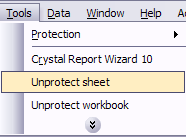
Then go ahead and open the Excel workbook that has the password on it that you would like to get rid of. There will be two new menu options under Tools, called Unprotect Sheet and Unprotect Workbook.
I created a test workbook and protected both the sheet and the workbook with a simple password at first. The program worked perfectly and it removed the protection very quickly!
UPDATE: This didn’t work on my file. Sigh.
 Subscribe to Around the Corner-MGuhlin.net
Discover more from Another Think Coming
Subscribe to get the latest posts sent to your email.
 Another Think Coming